Been a busy couple of weeks so slow updates.
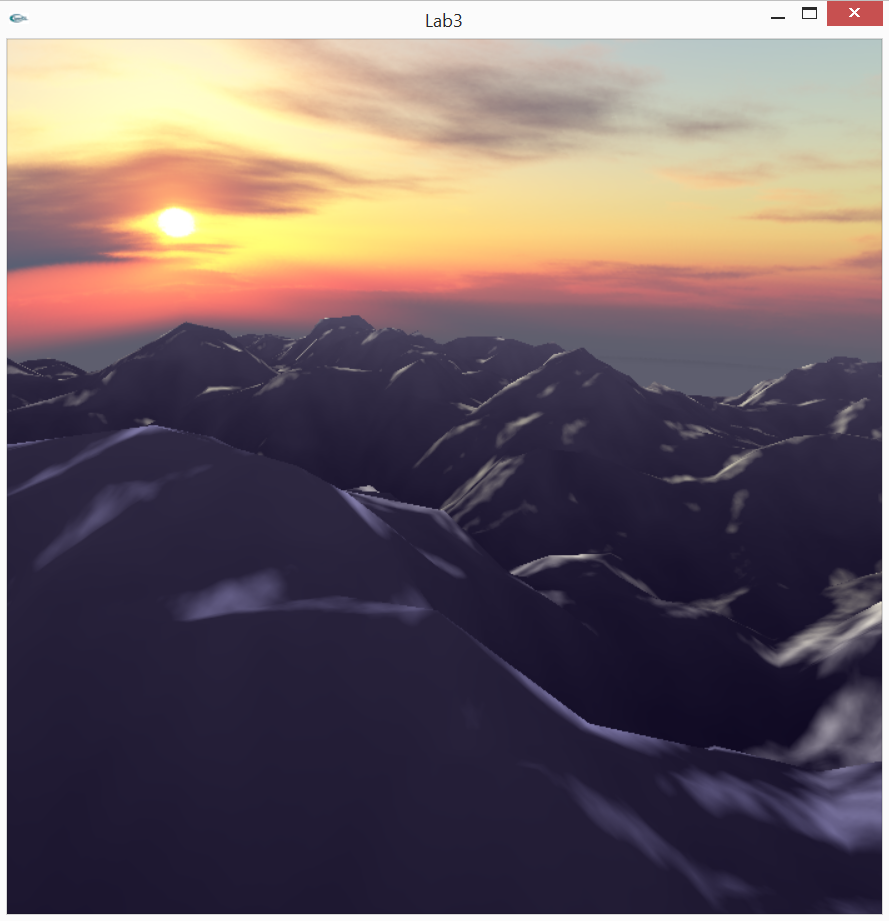
Trying to improve the lighting.. doing the normals was a bit tricky but this was ultimately very helpful. Now mountains look more realistic due to the lighting.
I'm technically not following the stanford curriculum anymore.. I just wanna make this one image as cool as I can so I wanna eventually add in water and fog in the background, after I get the normals working right for the mountains.
March 12, 2015
March 01, 2015
BOOM SON
My thing worked!
Perlin noise used here: I have an image of Perlin Noise and loaded that as a texture. Then in the vertex shader I did the texture map thing, got the x value, and set the height to that. So it's not terribly complicated but it look really cool, especially when it's rotated around. I really wish I had screen capture software but I'm paranoid to download things off the internet now after what happened last time.
Contemplating whether I wanna add water or just leave it as is.
Posted by
Gracula
February 28, 2015
Trying
So I made two separate shader programs: one for the skybox and one for the rest of the scene. Took a while in doing so because I'm an idiot sometimes and made some dumb mistakes.
Things for Grace to remember next time:
- Before calling glUniform[...] you need to make sure the appropriate shader program is loaded first (uniforms won't get passed through otherwise)
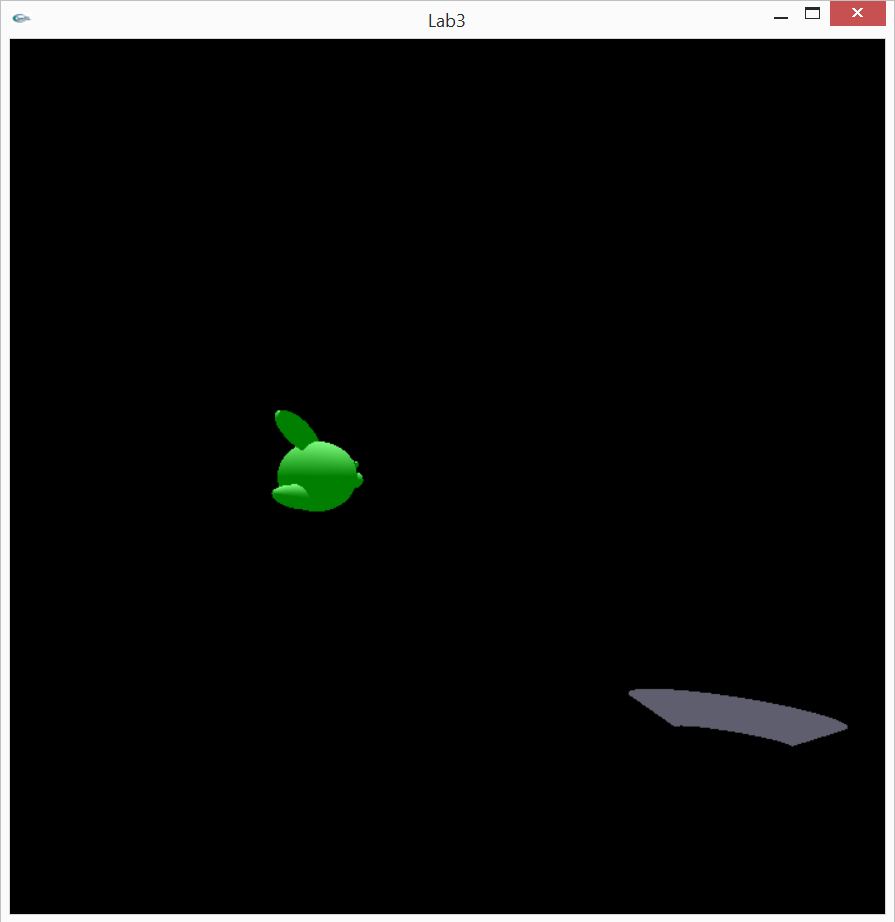
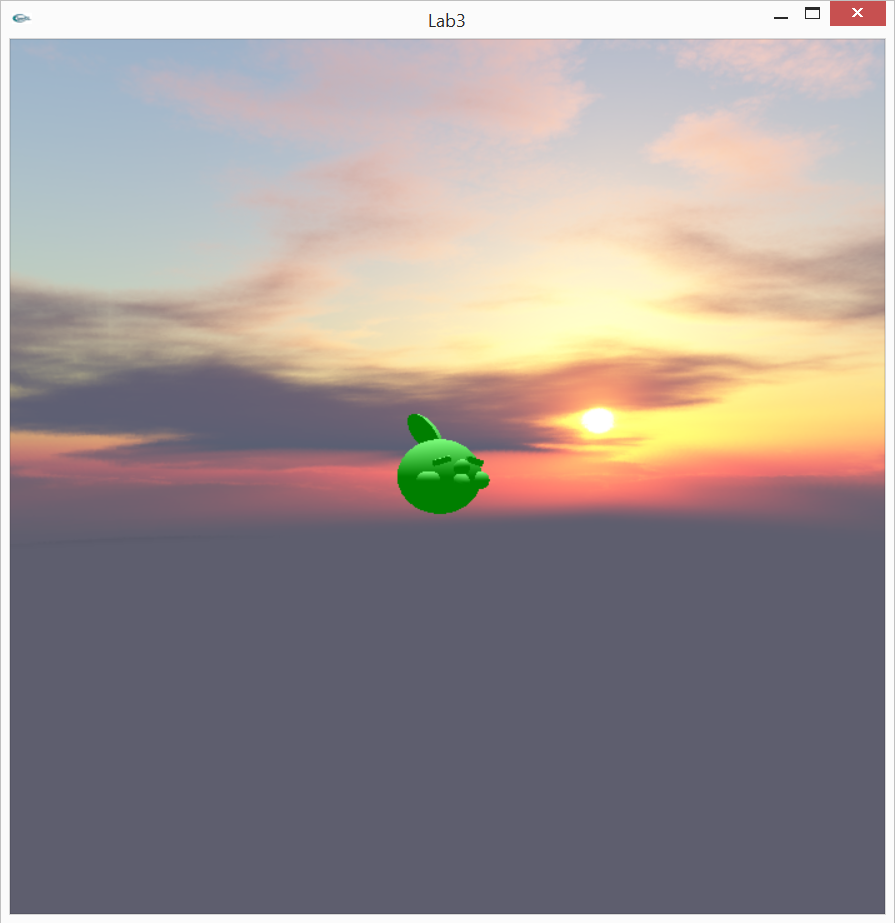
- If you don't bind the correct vao's right before drawing (if you have multiple shaders) then weird stuff happens where attributes of one shader affect the attributes of another. Left pic below, the weird shape in the bottom is supposed to be my skybox but it was affected by the Gulpin's geometry. Right pic is correct version. Hi Gulpin!
- You need to match up the names you're giving variables in the shaders with the names you call in glGetUniformLocation or glGetAttribLocation! Errors will result if not!
Many more. These are the ones I remember off the top of my head.
Trying a crack at procedural geometry, I eventually want to use Perlin noise but right now I'm just using a random number generator in the vertex shader to affect the height of the ground
SUCH a hack right now but it's a start.
Things for Grace to remember next time:
- Before calling glUniform[...] you need to make sure the appropriate shader program is loaded first (uniforms won't get passed through otherwise)
- If you don't bind the correct vao's right before drawing (if you have multiple shaders) then weird stuff happens where attributes of one shader affect the attributes of another. Left pic below, the weird shape in the bottom is supposed to be my skybox but it was affected by the Gulpin's geometry. Right pic is correct version. Hi Gulpin!
- You need to match up the names you're giving variables in the shaders with the names you call in glGetUniformLocation or glGetAttribLocation! Errors will result if not!
Many more. These are the ones I remember off the top of my head.
Trying a crack at procedural geometry, I eventually want to use Perlin noise but right now I'm just using a random number generator in the vertex shader to affect the height of the ground
SUCH a hack right now but it's a start.
Posted by
Gracula
February 20, 2015
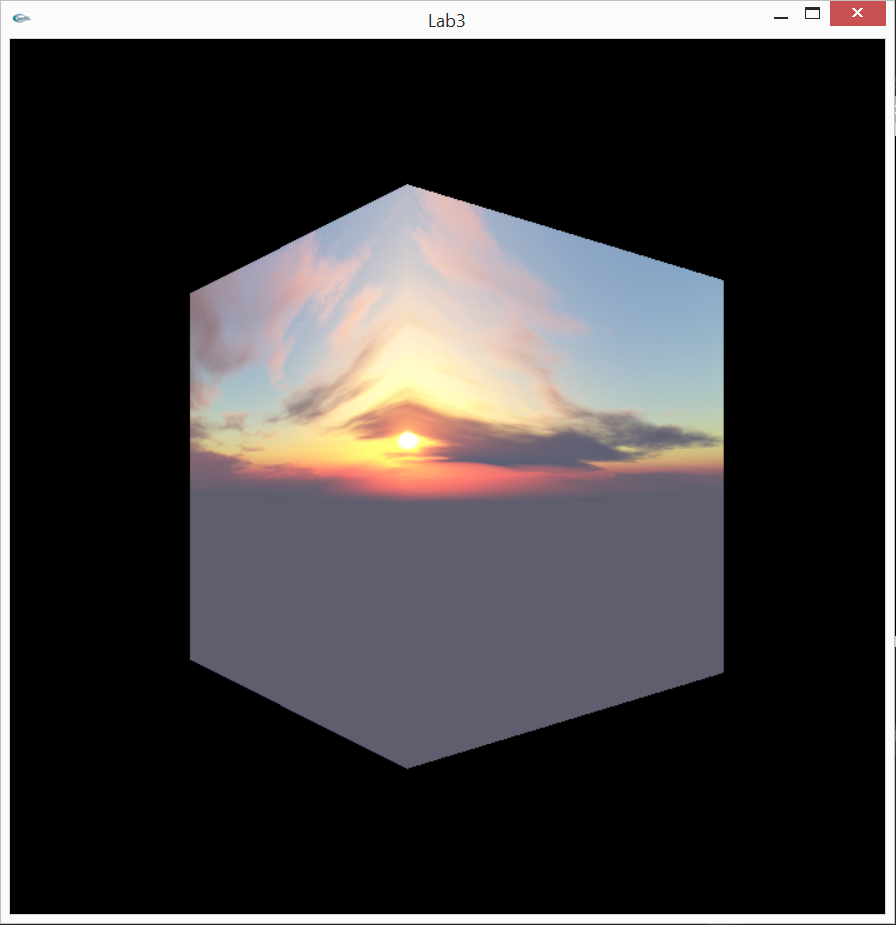
When you get seams on your skybox, don't just assume it's OpenGL's fault. Maybe you just suck at cutting images evenly.
It looks good now tho :)
I've never tried procedural terrain generation before but imma give that a try
It looks good now tho :)
| Outside the skybox |
| Inside the skybox |
I've never tried procedural terrain generation before but imma give that a try
Posted by
Gracula
February 19, 2015
Updates
I haven't been neglecting my graphics study.. I just had a small issue where both of my laptops stopped working within 2 weeks of each other, and I'm dumb and didn't use Github for any of them so I've had to rewrite all of them from scratch, twice. Plus side is that it's gotten quicker and easier each time.
Anyways, I've been trying to recreate this scene in OpenGL:
It's kinda an inside joke between me and a few school friends so I thought it'd be fun to make a project out of it (Assignment 2 on Stanford's calendar). Modeled the Gulpins in Maya and loaded them into OpenGL through an obj loader script I found online. I was gonna model Charizard but first laptop broke and for sake of time I just modeled an angry face.
Then second laptop broke and instead of going back to this project, I'm gonna start a new one that I had considered before. I'll post updates once I get enough of it working to show off.
Discovered SOIL as a way to load images into OpenGL which makes it a lot easier than last time I tried, once I got SOIL working. I'm starting to understand linkers and include directories better in Visual Studio but I definitely did not understand it before. And for SOIL you have to open up the directory in a separate Visual Studio project, build it, then copy the project over to your current project in order for it to work, which took me a long time to figure out. Once you get through the initial frustration of hooking of SOIL though, it seems to be a lot simpler than what I used last time for image loading.
I really wish I still had the code for my Harry Potter wand.. it was cool, especially since I've really been in a Harry Potter mood lately.
Anyways, I've been trying to recreate this scene in OpenGL:
It's kinda an inside joke between me and a few school friends so I thought it'd be fun to make a project out of it (Assignment 2 on Stanford's calendar). Modeled the Gulpins in Maya and loaded them into OpenGL through an obj loader script I found online. I was gonna model Charizard but first laptop broke and for sake of time I just modeled an angry face.
Then second laptop broke and instead of going back to this project, I'm gonna start a new one that I had considered before. I'll post updates once I get enough of it working to show off.
Discovered SOIL as a way to load images into OpenGL which makes it a lot easier than last time I tried, once I got SOIL working. I'm starting to understand linkers and include directories better in Visual Studio but I definitely did not understand it before. And for SOIL you have to open up the directory in a separate Visual Studio project, build it, then copy the project over to your current project in order for it to work, which took me a long time to figure out. Once you get through the initial frustration of hooking of SOIL though, it seems to be a lot simpler than what I used last time for image loading.
I really wish I still had the code for my Harry Potter wand.. it was cool, especially since I've really been in a Harry Potter mood lately.
Posted by
Gracula
January 19, 2015
Harry Potter Wand!!
This semester for independent study I'm trying to stick to a more structured curriculum.. last semester was nice and I still learned a lot but only restricting myself to the fragment shader of the graphics pipeline meant I avoided a lot of the dirty work, which unfortunately is very necessary in the real world. When my friend, taking rendering last semester, came to me for help, I was surprised at how unhelpful I was about seemingly simple concepts. So this semester I'll be following Stanford's CS 148 curriculum closely instead.
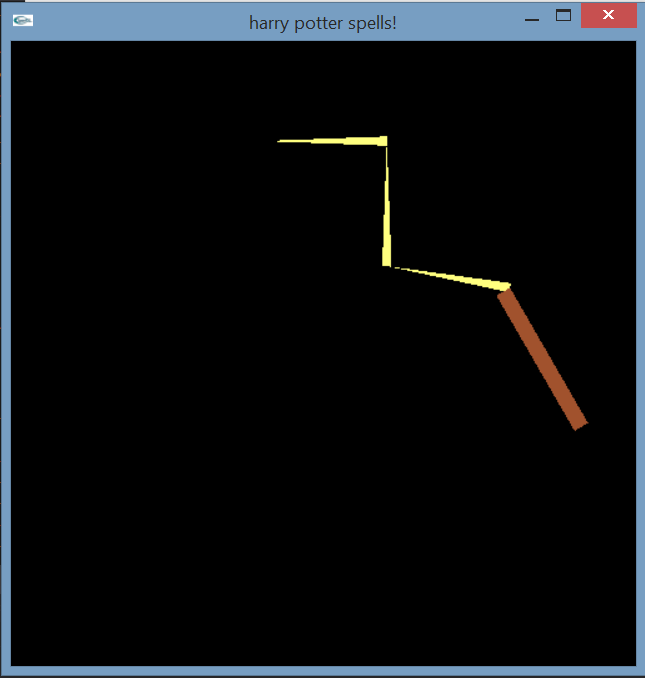
So I've pretty much finished their Lab 1, which was doing some 2D graphics with OpenGL. I've recently been on a Harry Potter kick lately so I decided to implement a wand that lets you cast four spells (lumos, aguamenti, baubillious, bombarda) with user input into the console window.
I still haven't managed to get a good gif software so I'm just posting screenshots for now, even though the animated spells in my program look better, I swear!
Aguamenti shoots out water (I figured a bunch of blue specks would be somewhat accurate). Baubillious makes a lightning bolt, bombarda produces small explosions, and we all know that lumos provides light. The animated lumos spell looks better, here it just looks dumb but the circles pulsate and it's actually pretty relaxing to watch.
Hey Stanford, did I get an A on this?
So I've pretty much finished their Lab 1, which was doing some 2D graphics with OpenGL. I've recently been on a Harry Potter kick lately so I decided to implement a wand that lets you cast four spells (lumos, aguamenti, baubillious, bombarda) with user input into the console window.
I still haven't managed to get a good gif software so I'm just posting screenshots for now, even though the animated spells in my program look better, I swear!
Aguamenti shoots out water (I figured a bunch of blue specks would be somewhat accurate). Baubillious makes a lightning bolt, bombarda produces small explosions, and we all know that lumos provides light. The animated lumos spell looks better, here it just looks dumb but the circles pulsate and it's actually pretty relaxing to watch.
Hey Stanford, did I get an A on this?
Posted by
Gracula
November 25, 2014
GLSL Eye ball
Just like the palm tree from earlier, I just made a step by step of iq's tutorial here of how he made an eye ball using shader code.
Let's do this!
First, we need a noise function. Noise is used to add a randomized look, and if altered correctly, can give the image a natural, organic effect. This is the noise function we will be using:
Here we are using our noise function.
We made an fbm function (stands for fractal brownian motion) which is better explained elsewhere on the web. But hey our noise looks better.
So we’ve replaced noise with fbm. This is just to show what the fbm function looks like.
Now let's start making the eye.
Put a circle in the middle of our screen. That will be the base of the eyeball.
Now we’re adding our fbm function. Makes it look more interesting.
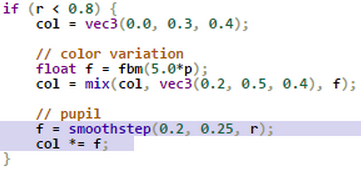
Add the pupil using smoothstep.
Add a yellow center
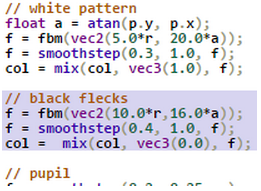
Let’s add a white pattern around the eye.
Alter the pattern by changing the parameters in our fbm function.
Back off on the white a bit using smoothstep.
Add some black flecks.
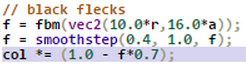
Actually, tweak the black flecks a bit.
Add a black border.
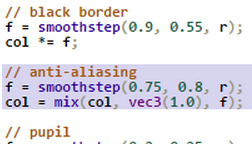
Edges are a bit aliased let’s fix that.
Apply some domain distortion to the atan to make the image a lil more interesting. Here, we are changing the angle with some fbm.
(I’m moving the a declaration up a bit).
We can tweak the frequency to change the pattern! Weird looking eye but the pattern could be used in cool ways for other things.
But let’s go for a more realistic eyeball.
Almost done! Wouldn't a fake reflection make it look even better?
Whoa that's bright.
Better.
Some tweaking - make the reflection a bit bigger in smoothstep, move it a little in length, and when assigning to color give a slight yellowish tint and make it softer.
Add some animation to make it look creepy. (Sorry, not animated here).
This just makes the animation non-uniform for different parts of the circle to make it even creepier.
//////////////////
And we're done! Isn't that cool?
So here's the entire source code:
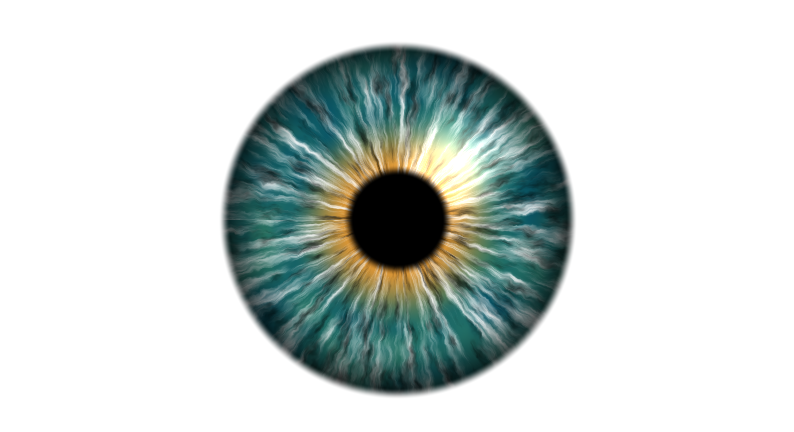
But I actually prefer green eyes so I made this one:
Here is his final result:
Let's do this!
First, we need a noise function. Noise is used to add a randomized look, and if altered correctly, can give the image a natural, organic effect. This is the noise function we will be using:
Let's make some noise!
| |
| |
So we’ve replaced noise with fbm. This is just to show what the fbm function looks like.
Now let's start making the eye.
| |
| |
| |
| |
| |
| |
| |
| |
| |
| |
| |
(I’m moving the a declaration up a bit).
| |
| |
Almost done! Wouldn't a fake reflection make it look even better?
| |
| |
| |
| |
| |
//////////////////
And we're done! Isn't that cool?
So here's the entire source code:
float hash( float n )
{
return fract(sin(n)*43758.5453);
}
float noise( in vec2 x )
{
vec2 p = floor(x);
vec2 f = fract(x);
f = f*f*(3.0-2.0*f);
float n = p.x + p.y*57.0;
float res = mix(mix( hash(n+ 0.0), hash(n+ 1.0),f.x),
mix( hash(n+ 57.0), hash(n+ 58.0),f.x),f.y);
return res;
}
float fbm(vec2 p) {
float f = 0.0;
f += 0.5000*noise(p); p *= 2.02;
f += 0.2500*noise(p); p *= 2.03;
f += 0.1250*noise(p); p *= 2.04;
f += 0.0625*noise(p); p *= 2.01;
f /= 0.9375;
return f;
}
void main(void)
{
vec2 uv = gl_FragCoord.xy / iResolution.xy;
vec2 p = -1.0 + 2.0*uv;
p.x *= iResolution.x/iResolution.y;
float r = sqrt(dot(p,p));
vec3 col = vec3(1.0);
float ss = 0.5 + 0.5*sin(4.0*iGlobalTime);
float anim = 1.0 + 0.1*ss*clamp(1.0 - r, 0.0, 1.0);
r *= anim;
if (r < 0.8) {
col = vec3(0.0, 0.3, 0.4);
float a = atan(p.y, p.x);
a += 0.05*fbm(20.0*p);
// color variation
float f = fbm(5.0*p);
col = mix(col, vec3(0.2, 0.5, 0.4), f);
// yellow center
f = smoothstep(0.5, 0.2, r);
col = mix(col, vec3(0.9, 0.6, 0.2), f);
// white pattern
f = fbm(vec2(5.0*r, 20.0*a));
f = smoothstep(0.3, 1.0, f);
col = mix(col, vec3(1.0), f);
// black flecks
f = fbm(vec2(10.0*r,16.0*a));
f = smoothstep(0.4, 1.0, f);
col *= (1.0 - f*0.7);
// black border
f = smoothstep(0.9, 0.55, r);
col *= f;
// reflection
f = 1.0 - smoothstep(0.0, 0.3,
length(p - vec2(0.25, 0.25)));
col += vec3(1.0, 0.9, 0.8)*vec3(f)*0.7;
// anti-aliasing
f = smoothstep(0.75, 0.8, r);
col = mix(col, vec3(1.0), f);
// pupil
f = smoothstep(0.2, 0.25, r);
col *= f;
}
gl_FragColor = vec4(col, 1.0);
}
{
return fract(sin(n)*43758.5453);
}
float noise( in vec2 x )
{
vec2 p = floor(x);
vec2 f = fract(x);
f = f*f*(3.0-2.0*f);
float n = p.x + p.y*57.0;
float res = mix(mix( hash(n+ 0.0), hash(n+ 1.0),f.x),
mix( hash(n+ 57.0), hash(n+ 58.0),f.x),f.y);
return res;
}
float fbm(vec2 p) {
float f = 0.0;
f += 0.5000*noise(p); p *= 2.02;
f += 0.2500*noise(p); p *= 2.03;
f += 0.1250*noise(p); p *= 2.04;
f += 0.0625*noise(p); p *= 2.01;
f /= 0.9375;
return f;
}
void main(void)
{
vec2 uv = gl_FragCoord.xy / iResolution.xy;
vec2 p = -1.0 + 2.0*uv;
p.x *= iResolution.x/iResolution.y;
float r = sqrt(dot(p,p));
vec3 col = vec3(1.0);
float ss = 0.5 + 0.5*sin(4.0*iGlobalTime);
float anim = 1.0 + 0.1*ss*clamp(1.0 - r, 0.0, 1.0);
r *= anim;
if (r < 0.8) {
col = vec3(0.0, 0.3, 0.4);
float a = atan(p.y, p.x);
a += 0.05*fbm(20.0*p);
// color variation
float f = fbm(5.0*p);
col = mix(col, vec3(0.2, 0.5, 0.4), f);
// yellow center
f = smoothstep(0.5, 0.2, r);
col = mix(col, vec3(0.9, 0.6, 0.2), f);
// white pattern
f = fbm(vec2(5.0*r, 20.0*a));
f = smoothstep(0.3, 1.0, f);
col = mix(col, vec3(1.0), f);
// black flecks
f = fbm(vec2(10.0*r,16.0*a));
f = smoothstep(0.4, 1.0, f);
col *= (1.0 - f*0.7);
// black border
f = smoothstep(0.9, 0.55, r);
col *= f;
// reflection
f = 1.0 - smoothstep(0.0, 0.3,
length(p - vec2(0.25, 0.25)));
col += vec3(1.0, 0.9, 0.8)*vec3(f)*0.7;
// anti-aliasing
f = smoothstep(0.75, 0.8, r);
col = mix(col, vec3(1.0), f);
// pupil
f = smoothstep(0.2, 0.25, r);
col *= f;
}
gl_FragColor = vec4(col, 1.0);
}
But I actually prefer green eyes so I made this one:
| (link to shadertoy) |
Posted by
Gracula
Subscribe to:
Posts (Atom)